

Where metadata comes from
To point the agent at a specific key in its instructions, mention it with
@. See Personalize the initial context with metadata.
To have the agent ask for or collect information during the conversation, use Variables.
Find the section
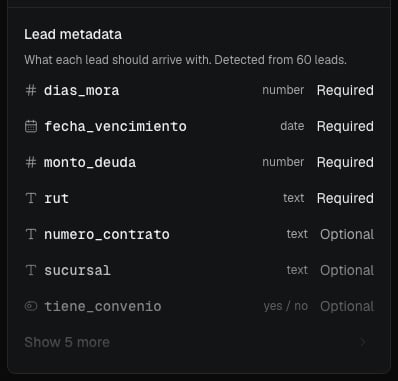
Open the agent, open one of its tasks, and look in the right pane. Lead metadata is below Stages. It appears only when the task’s leads arrive with metadata. The list is read-only: it always shows what Nexor detects in the leads.Read the list
Each row is one key:
Required keys come first, then the keys that more leads carry. The subtitle, What each lead should arrive with. Detected from N leads., says how many leads the list was detected from. A list longer than 7 keys shows the first 7 and folds the rest behind Show N more. Show fewer folds them again.
How Nexor detects the keys
The list describes what arrived. It does not change how the agent behaves and does not reject a lead that arrives without a key.