

Where to find it
Select the agent, open the right pane (Configuration), and go to Channels. The Router is the first block of that section.Router off: one task receives every inbound lead
The switch is off by default and reads Off: everything goes to one task. Choose the task under Inbound leads go to. Every new inbound lead on the agent’s channels starts in that task.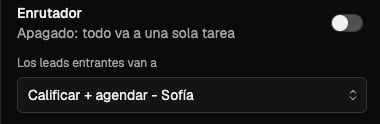
Router on: Nexor picks the task
Turn the switch on and it reads Nexor picks the task based on what the lead says. Nexor reads the first message of each new inbound lead and sends the lead to the task that fits it. The selector below changes to If it’s unclear, route to. That is the fallback task: it receives the lead when the message does not make clear which task should handle it.Which leads go through the Router
The Router only decides for leads without an open conversation in the agent.Channels belong to the agent
All tasks of an agent share its numbers and inboxes: WhatsApp, calls, SMS, iMessage, email, and web chat. You connect a channel once on the agent and every task uses it. The Router decides which task answers; the channel stays the same.Inbound calls need the Router
If the agent receives inbound calls, the Router must stay on. Trying to turn it off shows:This agent takes inbound calls, which need the router. Turn off inbound calls first.Turn off inbound calls for the agent first, then turn off the Router.
Next
Tasks that work together
Split a process into tasks and hand leads from one task to the next.
Agents and tasks
What the agent shares with its tasks and what each task controls.