

Watch the walkthrough
Use the sections below for the current category, billing, and approval rules.Why templates are required
WhatsApp limits when a business can message a customer. The key concept is the 24-hour customer service window.- When a customer sends you a message, a 24-hour window opens. Inside that window your agent can reply with free-form messages (text, media, interactive messages) at no Meta messaging charge.
- Once 24 hours pass without a new message from the customer, the window closes. You can no longer send free-form messages.
- To reach a customer outside the window, or to start a brand-new conversation, you must send an approved template. Sending a template re-opens the conversation.
Templates protect customers from spam. Because anyone could otherwise message at any time, Meta requires that the first message outside an open window follow a format it has reviewed and approved.
Template categories
Every template belongs to one of three categories: Marketing, Utility, or Authentication. The category affects how Meta reviews the template and how much each message costs.
Nexor submits every template as Utility by default. When Meta reviews a template, it can reclassify it into whichever category it considers correct, and that changes how the template is billed.
Meta bills template messages directly to your WhatsApp Business Account (WABA) payment method. These charges are separate from your Nexor plan. See Meta’s pricing for current rates.
Creating and deleting templates
In the current interface, open Integrations → WhatsApp and click Templates beside the WhatsApp Business number. The button is beside the number’s actions, outside the … menu. It is also available when the number has no assigned agent.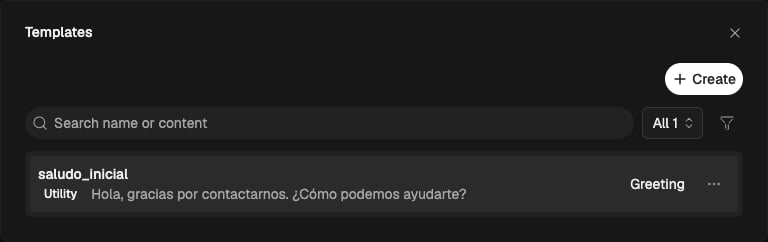
- Create: click Create, configure the type, content and example values, then submit the template for Meta review. All reviews are performed by Meta.
- Preview: click a template’s name.
- Delete: open the template’s … menu, choose Delete, and confirm deletion.
This guide is adapted from the Kapso documentation. Nexor uses Kapso as its WhatsApp infrastructure provider — credit and thanks to the Kapso team.