

Default: on, to Owners and Admins
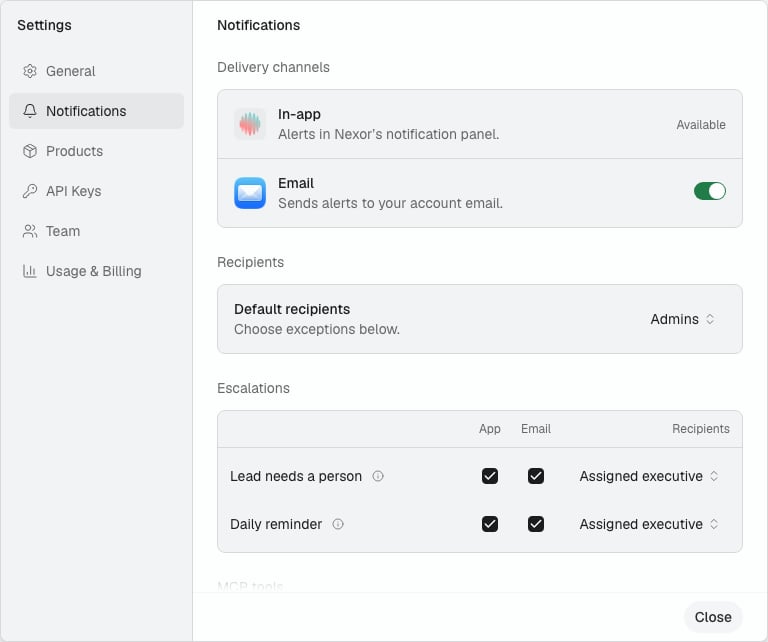
Every notification is on by default. It goes to the workspace’s Owners and Admins, in the app and by email. You do not need to set anything up.Choose who receives them
Default recipients applies to every notification at once:
To make an exception, change Recipients on a notification’s row. Default means the row follows Default recipients; the other options apply to that row only.
A change applies to the next notification. Your choice is applied exactly as saved: if you pick specific members and none of them is on the team anymore, nobody is notified. Nexor never falls back to other people.
Turn a notification off
Uncheck both App and Email on its row. Nobody receives it.Escalations go to the assigned executive first
The two escalation rows, Lead needs a person and Daily reminder, always notify the lead’s assigned executive. Leads with no assigned executive notify the people chosen under If unassigned, notify: in the row’s Recipients menu. If both channels are unchecked, nobody is notified, not even the assigned executive. The daily reminder is one message per person on weekdays. Each assigned executive counts their own waiting leads, and the row’s recipients count the unassigned ones. It is sent when enough leads are waiting: two by default.Channels
Uncheck a channel on a row to stop it for that notification only. The Email switch under Delivery channels turns email on or off for every notification at once.
When emails are sent
Emails are sent between 9:00 and 21:00 in your workspace’s time zone. An email that comes up outside those hours waits until 9:00. If you turn that notification off, or remove the person, before then, the email is not sent. In-app notifications are never delayed. Tool server error is sent at any hour, because a failing server can affect leads right away.The notifications
The same alert is not repeated for 24 hours, so a broken connection does not flood your team. Tool server error is the exception: it is sent once for each lead the failure affects.