

Start a test
- Select your agent in the left sidebar.
- Click Test this agent at the top of its chat. If a task is open, the button says Test task and tests that task.
- Choose the task you want to test. The task where new conversations start is marked Entry point.
- Choose where to talk to it, and start writing.
Choose where to test
Only the channels that are ready for that agent appear. To test a channel that’s missing, connect it first in the agent’s Channels.
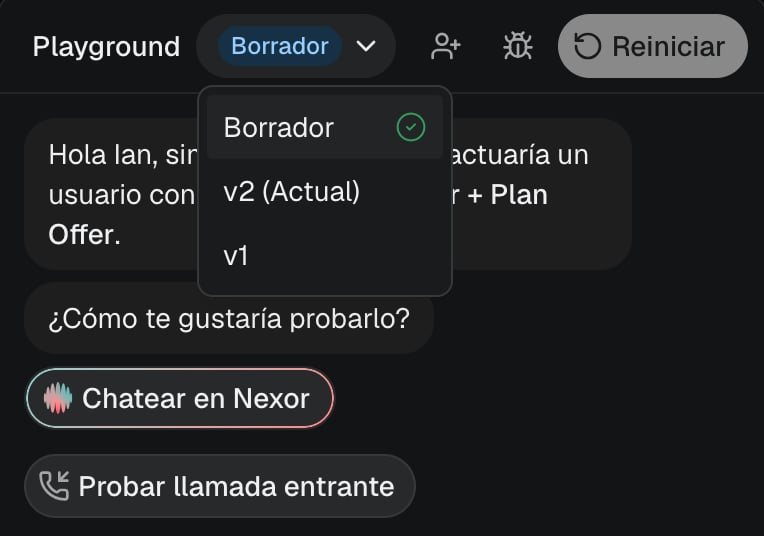
Test the draft or a version
When the agent is already live, your changes go into a draft and the Playground tests that draft. The version selector in the header shows Draft. Your leads keep using the published version until you publish.- On WhatsApp, iMessage, SMS, Email and Call, the test goes out from the agent’s own number or address, and your replies come back to the draft.
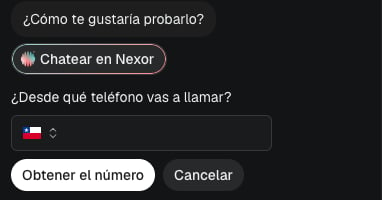
- To test how the draft answers a call, choose Test inbound call below the channel options. Enter the phone you will call from, then call the agent’s number shown within 15 minutes.
- Draft calls always use the draft’s own voice. If you changed the draft since its voice was last prepared, choosing Call or Test inbound call prepares it while you enter your phone, and the call starts as soon as the voice is ready. It can take a few minutes. Choose Cancel to drop the waiting call. More on the draft’s voice.
What’s real in a test
- The test uses a test lead. It moves through the task’s stages and saves what the agent collects, so you can watch the lead advance. Test leads stay out of your lead lists unless you turn on Show test leads.
- Your own tools, the ones that call your systems, run for real. Nexor marks those requests as a test so your system can tell them apart.
- Actions that change other systems are simulated: booking in a calendar, updating your CRM, and payments. The test shows that they were simulated.
What to try
Change one thing and test again
After the agent replies, choose Edit agent above the Playground message box. Your adjustment appears in the same conversation, with the test’s stages still visible on the left. Tell Nexor AI which answer or rule to change. Once the change is saved, the in-app test automatically repeats your last question and shows the new answer below the change. The previous answer stays visible so you can compare. With no previous question, you return to the test message box. External channels never resend automatically. Back to test switches the composer without losing what you typed in either box. On a live agent, the change goes into the draft: your leads don’t see it until you publish it with Publish changes. On an agent that is still being set up, changes apply directly.1
Note what went wrong
Keep the exact message and the reply you want to change.
2
Change one thing
Edit the setting, or ask Nexor AI to change it in the agent’s chat.
3
Return to the test
After a saved edit, compare the automatic follow-up with the previous answer in the same thread. You can also choose Back to test at any time. Use Restart to replay the scenario from the beginning.
4
Repeat the same scenario
Write the same messages and compare the result.
Give your test lead more context
Before starting, choose Set up your test above the message box. Add a JSON object with values the agent should know about this lead. For example, choose Use example to add{"locations_count": 3}, then ask how the answer changes for a business with three locations. Metadata is optional and applies only to the test lead. To try different details afterward, choose New test or Restart, review the details and confirm Start new test. The previous conversation stays in history.
You can also open Lead metadata above the composer to edit the current test’s saved details without restarting. The JSON editor highlights keys and values. Edit agent remains available when you reopen a saved test.
Test tasks that work together
Start in the first task and move the conversation toward its final stage. When the lead reaches it, check that the next task takes over and follows its own instructions. See Tasks that work together.Next
Channels and leads
Connect where your agent talks and where your leads come from.
Go-live checklist
What to check before your agent talks to real leads.
Drafts and versions
Publish tested changes, see every version, and go back to a previous one.