

Who is notified
When a lead is escalated, the lead’s assigned executive is notified. If no one is assigned, the workspace’s Owners and Admins are notified, in the app and by email. To change who is notified, or to turn these alerts off, see Notification settings.Automatic assignment
An escalation can get an owner the moment it opens. Open the Escalated to executive stage in the stage settings and check Assign on entry. With it on, each new escalation goes to the next person in rotation (round robin).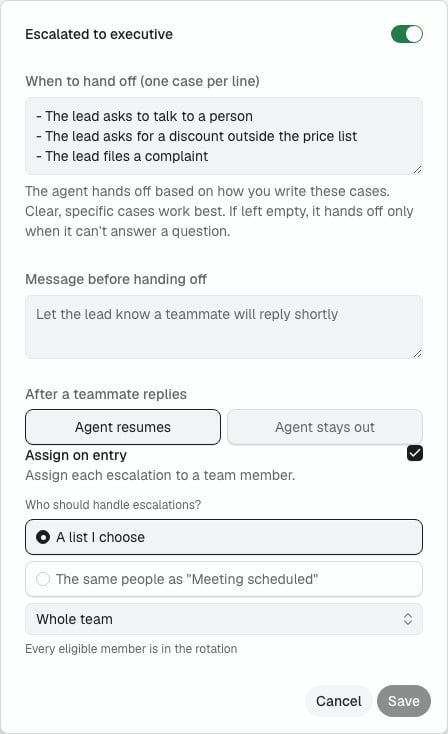
- A lead that already has an owner keeps it, and that person handles the escalation.
- If nobody in the rotation is available, for example because their access was deactivated or disabled, the escalation opens without an owner.
- Turning on human escalation for an Agent also checks Assign on entry. Uncheck it before saving to keep escalations unassigned.
Find the case
Open Inbox, then select Escalated. Owners and Admins on accounts without an active WhatsApp Coexistence number see the same queue as Pending. Open the lead and review Details. An Agent escalation can show:- The lead said, with quoted conversation context.
- Why the agent escalated, with the reason it asked for help.
- Go to message, which opens the message shown in the full conversation.
When the Agent hits an error
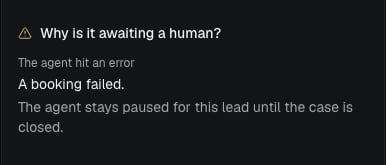
Error escalation is an optional feature, off by default and enabled on request. When it is enabled for your account and human escalation is turned on for an Agent, Nexor also escalates a lead on its own when the Agent cannot continue the conversation because of an error:- The Agent could not write a reply.
- The Agent’s reply could not be delivered to the lead.
- A booking failed for a technical reason, for example a calendar that cannot be reached.
- An email reply failed.
Reply without closing the case
- Open the escalated lead.
- Write the reply in the conversation message box.
- Send the message.
Email escalations
When an Agent escalates an email conversation, the message box works like an email:- To shows the lead’s email address.
- Cc adds up to 20 more addresses, for example a teammate. Separate them with commas.
- Enter adds a new line. To send, select Send, then Now.
- The subject continues the lead’s last email, for example
Re: Cost segregation quote.
Close the case
Use Mark as to choose the outcome:
If another Human Assistance case remains open for the lead, closing one case does not return the conversation to the Agent.
Take over a conversation
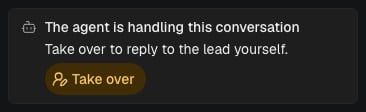
Owners, Admins and Members can take a conversation from the Agent at any time, without waiting for the Agent to escalate.- Open the lead and go to Details. While the Agent has the conversation, the card reads The agent is handling this conversation.
- Select Take over.
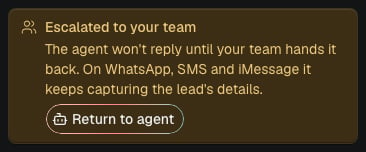
- The card changes to Escalated to your team, and the lead appears in Inbox under Escalated (or Pending, see Find the case).
- The Agent stops replying to the lead. On WhatsApp, SMS and iMessage it keeps capturing the lead’s details.
- It works even when escalation is turned off for that Agent.
- Nobody is notified and nobody is assigned, because a person already has the conversation. The lead keeps its current owner.
Manual ownership
To take a conversation on purpose, use Take over. A manual WhatsApp or SMS message sent from Inbox can take ownership of the conversation. In this path, Nexor attempts delivery before it updates ownership. A message sent from the connected WhatsApp Business App through Coexistence can also take ownership: the app delivers it first, then Nexor mirrors the outgoing message and attempts the ownership update. In either path, seeing a sent message does not confirm that the conversation moved to human ownership. Automatic human ownership after a manual send is implemented only for WhatsApp and SMS. A manual email, iMessage, Instagram, Messenger, or web chat message does not have the same verified ownership behavior.Return a manually owned conversation
Owners and Admins can use the control in Details. When it reads Automation paused for this lead, turn automation back on to return the conversation to the Agent. Members can reply to an escalation and close it with Mark as → Resolved. Members do not see the general automation control in Details, so they cannot use that control to return a conversation taken through a manual message. An Owner or Admin must return it. The same contact-sequence limitation still applies: returning the conversation allows the next incoming message to reach the Agent, but it does not restart proactive contact.Channel delivery limits
- WhatsApp: a free-form reply is available while the customer-service window is open. Outside that window, Nexor automatically wraps the reply in a preapproved human-support template for the conversation language. That template must exist, and the reply is limited to 1,024 characters.
- Instagram and Messenger: there is no template fallback after the reply window closes.
- Email: the lead needs an email address and the account needs a verified sender.
- SMS and iMessage: the lead needs a phone number.
- Web chat: the reply is recorded in the thread and appears when the widget refreshes its history.
- Voice: escalation replies are not supported during a call.