

What appears on the Billing page
Some cards appear only when the account has the corresponding subscription or Stripe data. If you see No active subscription, contact your Nexor account team to confirm your terms.
What counts as a used lead
Usage is based on the number of unique leads that enter the agent to be contacted, whether or not they reply. Loading leads into the platform does not generate usage by itself. For example, if you upload 1,000 leads and 420 of them enter the agent to be contacted during the current period, the usage counter will be 420 leads, even if only some of them reply. Each lead is counted only once per period, no matter how many messages it receives. If the agent handles that same lead again to contact it in a later period, it counts again as usage for that new period. Only contacts made by Nexor count: agent messages, automated templates and follow-ups, agent calls, and Nexor moving the lead into a contacted stage. Messages your team sends by hand, from Nexor or from the WhatsApp Business app, do not count. Neither do reactions or WhatsApp Business automatic replies. Test and playground leads are excluded. Deleted leads are also excluded from the usage calculation.The Billing page uses a short-lived cache. A newly contacted lead can take up to about ten minutes to appear in the counter. Final invoice calculation uses the current source data rather than the displayed cache.
When the quota resets
For an account with a Stripe subscription cycle, the usage period follows that cycle. The page shows the date when the period is billed. Accounts without a Stripe cycle use a calendar-month counter and show the date when included leads reset. Do not assume every account resets on the first day of your local month. Follow the date shown below the usage counter. Any temporary leads granted for the current period are included in the quota displayed for that period and expire when the next period begins.What happens above the limit
There are two account behaviors:- Overage enabled: Nexor continues processing eligible leads. Each contacted lead above the included quota is charged at the extra-lead rate shown on the page.
- Hard cap: new leads can be rejected at intake after the account reaches its configured cap. They are not automatically placed in a billing queue.
Manage a card or pending payment
1
Link a card
In Payment method, select Link a card. Nexor opens a Stripe-hosted page where you can enter the card securely.
2
Update an existing card
Select Manage in Stripe to open the Stripe customer portal. Update the payment method there, then return to Billing.
3
Replace an expired activation link
If the page shows Payment pending, select Generate new payment link. The previous activation link may have expired.
Read the upcoming invoice
Upcoming invoice is an estimate, not a final receipt. It can include the recurring subscription amount, additional phone numbers, projected contacted-lead overage, and other Stripe line items. The total can change before the invoice is finalized if usage changes. Open a previous item in Invoices to view its Stripe invoice. The page initially shows the most recent invoices; use Show all to expand the list.Pausing an agent does not cancel the contract
Pausing and cancellation are separate actions:
To stop new leads while an agent is paused, review its routes on the relevant integration page. Pausing an agent alone is not a billing change.
Review alternatives before cancelling
When this flow is available, choose a reason and select Continue. Your account advisor receives the context and reviews your account proactively. Returning to your account does not cancel your subscription or book a meeting. Depending on your account and the reason, you may see an alternative: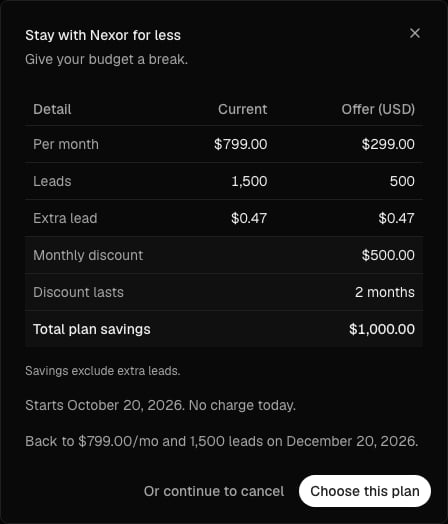
Cancel or reactivate the subscription
Only the workspace Owner sees these controls.1
Open the Plan section
Scroll to Plan at the bottom of Settings → Usage & Billing.
2
Schedule cancellation
Select Cancel subscription, choose a reason, add an optional comment, and confirm.
3
Check the end date
The subscription remains active through the paid period shown on the page. Your agents continue working until that date, and the base subscription will not renew after it.
4
Reactivate before it ends
Select Reactivate before the end date to withdraw the scheduled cancellation.
Common questions
Why does Billing show 0 used when I already loaded leads?
Why does Billing show 0 used when I already loaded leads?
Loaded leads do not count until Nexor contacts them. The counter can also take up to about ten minutes to reflect a newly contacted lead.
Why does a lead from a previous month count again?
Why does a lead from a previous month count again?
Usage is counted per period. A lead counts once in each period in which Nexor contacts it, so a lead contacted last month and contacted again this month also counts this month.
Will Nexor stop, queue, or charge extra after my quota?
Will Nexor stop, queue, or charge extra after my quota?
It depends on the account terms. Overage-enabled accounts continue and charge the displayed rate per extra contacted lead. Hard-capped accounts can reject new lead intake, without an automatic billing queue.
When and how much will I be charged?
When and how much will I be charged?
Follow the period date and extra-lead rate in the usage card. Upcoming invoice shows the current estimate and line items; the finalized Stripe invoice is the final amount.
Why can I not see Cancel subscription?
Why can I not see Cancel subscription?
Only the workspace Owner can cancel or reactivate the subscription. An Admin or Member can ask the Owner to complete the change.