

- The native Odoo connection signs in to an Odoo instance with its URL, database, username or email, and Odoo API key. It discovers readable CRM objects and provides an Inputs workspace.
- The generic inbound webhook alias lets an external automation push a lead to Nexor at
POST /api/public/leads/odoo. It does not sign in to Odoo or expose the native workspace.
Native Odoo connection
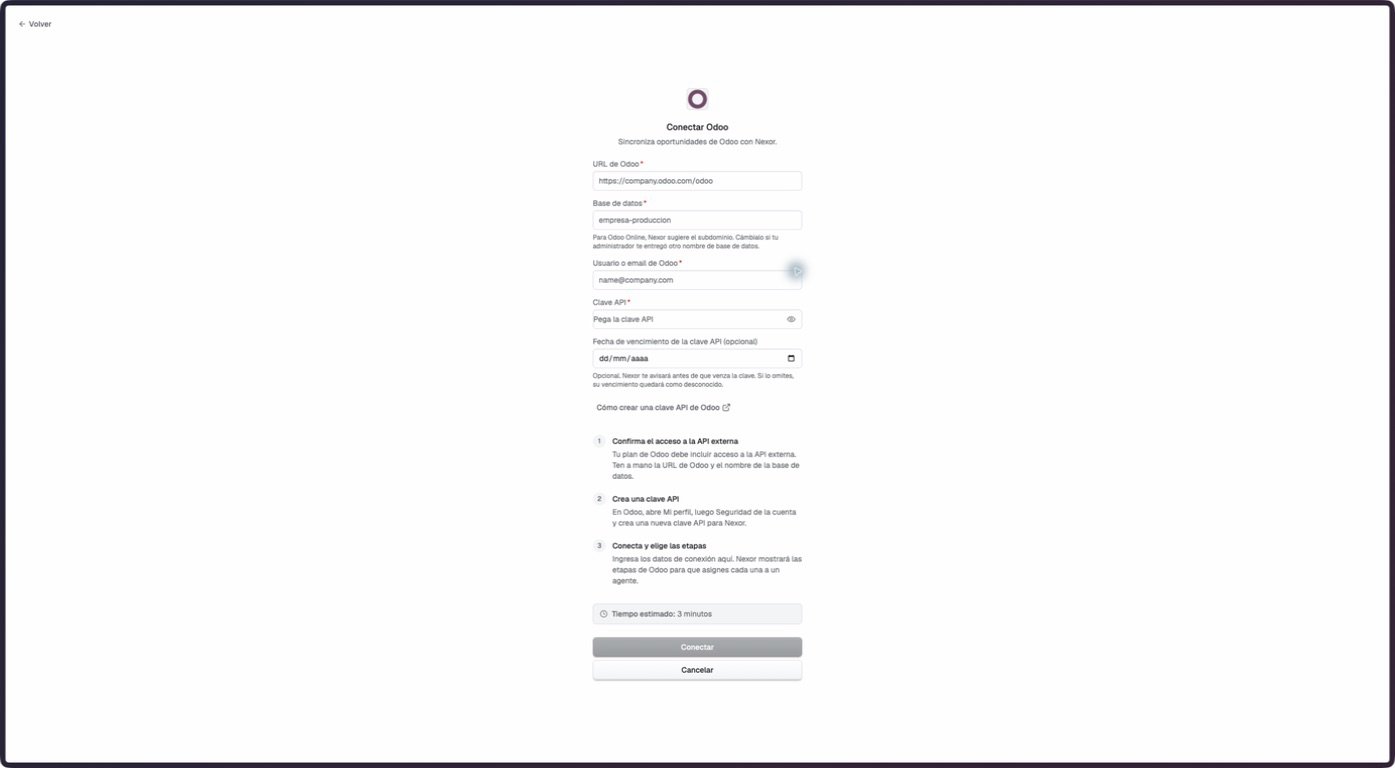
The empty native Odoo connection form in staging on September 7, 2026. No credential was entered or exposed.
Before connecting
The Odoo account must have external API access, the CRM application installed, and read permission for the leads or opportunities, contacts, sales teams, and stages shown in the connection guide. Nexor’s repositories do not establish which commercial Odoo plan provides that access. Prepare these values:- Odoo URL
- Database
- Odoo username or email
- API key
- API key expiry date, if the key has one
Connect and discover capabilities
1
Open Odoo
Go to Integrations → Odoo and confirm the prerequisites shown on the page.
2
Enter the connection details
Fill in the Odoo URL, database, username or email, and API key. Add the expiry date only when one is known.
3
Connect
Select Connect. Nexor validates the credential and discovers the readable companies, teams, stages, record types, and fields available to the account.
4
Review the capability report
Confirm the detected Odoo version, transport, readable objects, and the current read-only limitation before configuring Inputs.
Configure and preview Inputs
The connected workspace lets an operator prepare how Odoo records should be interpreted. Saving this configuration does not enable the currently disabled import application.Cutoff and intake routes
Choose the earliest Odoo record creation date to read. An intake route can combine company, sales team, stage, and record type (lead, opportunity, or both), then assign one of these effects:
- Create or continue in Nexor: select a Nexor Agent that would manage the person.
- Observe only: keep the opportunity visible without starting or moving an Agent.
- Do not synchronize: exclude matching records.
Lifecycle inputs
The eventswon, lost, restored, and archived can each be mapped to an Agent stage. These mappings describe the intended input behavior but are not applied while native import application remains disabled.
Fields and transformations
Map fields fromcrm.lead or res.partner to name, last name, email, phone, company, job title, city, date of birth, or an approved metadata.* key. The configuration accepts up to 200 mappings and one active mapping for each destination.
Available transformations include trimming text, lowercasing email, normalizing phone numbers, boolean and number conversion, date and date-time conversion, enum mapping, and relationship ID extraction. A resulting lead needs a name and at least an email or phone.
Safety limits
The defaults allow at most 200 new people in one run and pause when a preview exceeds 1,000. The server accepts a configurable preview pause threshold of no more than 5,000, and it must be at least as high as the per-run limit.The native configuration uses a fixed 10-minute read interval. With import application currently disabled, that setting does not cause Odoo records to create or move people in Nexor.
Preview
Select Preview to inspect the plan without creating people or changing Odoo. A preview is tied to the exact saved configuration and expires after 30 minutes. A preview must be current, complete, below the safety threshold, and free of unresolved conflicts before activation can pass its normal validations. Activation is still blocked by the current product-level availability limit. If opportunities for one person point to different Agents, the conflict center can record which opportunity to keep active or whether to ignore the case. Resolving the conflict records a decision only; it does not contact the person, synchronize the record, or write to Odoo.Generic inbound webhook alias
POST /api/public/leads/odoo is a compatibility alias for the generic inbound lead webhook. An external automation sends a lead payload to Nexor; it does not use the native Odoo connection or its API key.
Use a Nexor intake API key in the token query parameter. A field map attached to that key can translate external names into Nexor’s canonical lead fields. Without a map, the endpoint expects the canonical payload. See Inbound lead webhooks for authentication, payload, routing, and response details.