

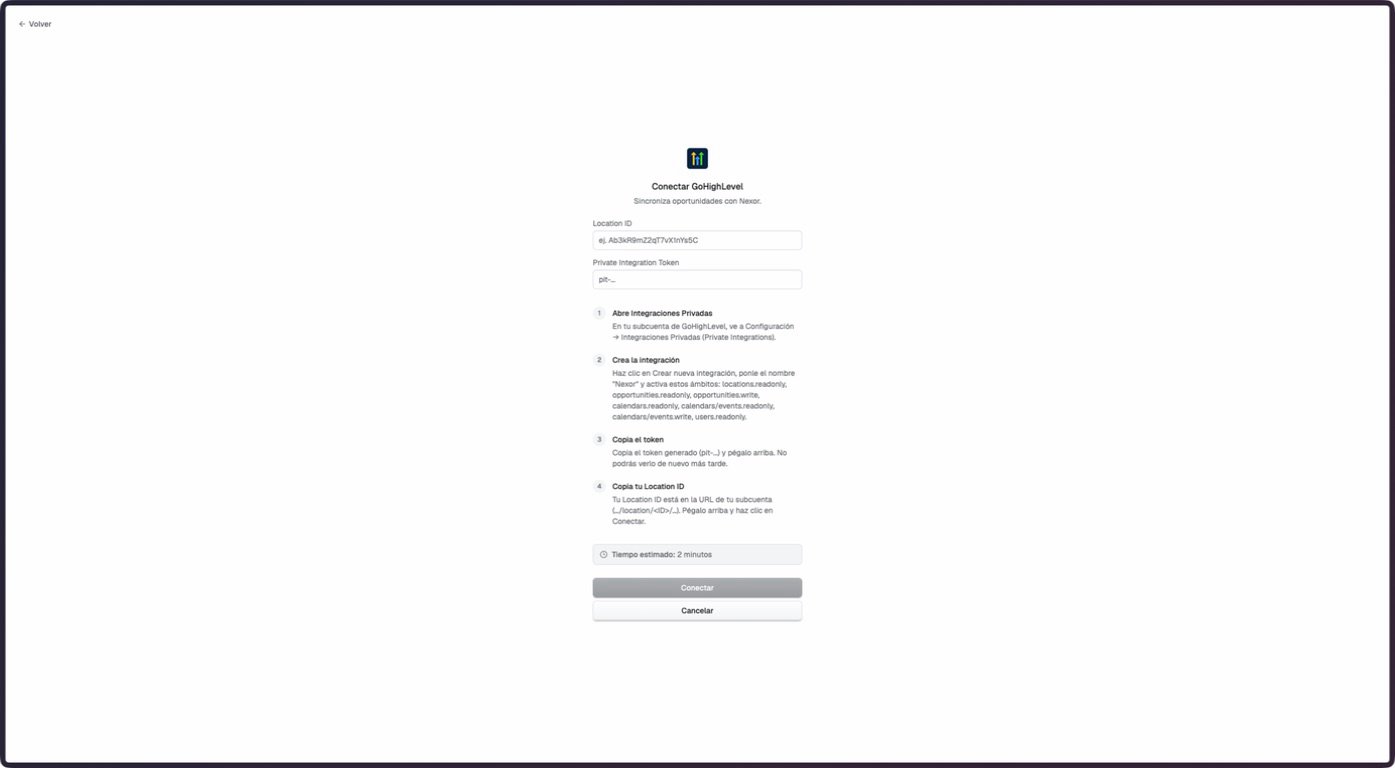
GoHighLevel connection screen observed in staging on September 7, 2026. The staging interface was displayed in Spanish.
The staging documentation account had no connected GoHighLevel Location. This walkthrough confirms the empty connection form only. Connected subaccount, routing, auto-sync, webhook, and outcome screens were verified against the current product code but could not be captured safely in staging.
What the integration supports
This is not a continuous mirror of every GoHighLevel object or stage. The current output runs for configured terminal outcomes.
Before you connect
You need the Location ID and a Private Integration Token for the Location. Create the token under GoHighLevel Settings → Private Integrations and treat it as a secret.Connect a Location
1
Create a private integration
In the intended GoHighLevel Location, open Settings → Private Integrations. Create a private integration with the permissions confirmed for the features that will be used.
2
Copy the credentials once
Copy the Location ID and the Private Integration Token. Do not place the token in screenshots, tickets, or shared documents.
3
Connect in Nexor
Go to Integrations → GoHighLevel, enter the Location ID and token, and select Connect.
4
Add another subaccount if needed
After the first connection, use Add subaccount to connect another Location. The subaccount selector appears when two or more connections exist.
Route incoming opportunities
Open Inputs → Lead routing. Configure each listed source with one of these destinations:- An active Agent that should receive eligible opportunities.
- Don’t import when the source must stay outside Nexor.
- The default route for sources that do not match a specific saved rule.
Real-time webhook
Open Real-time webhook, copy the generated URL, and add it as a Custom Webhook action inside the relevant GoHighLevel Workflow.Pause one route
Turn off Accepting leads on a saved route to pause it without deleting its configuration. The paused route stops accepting both real-time webhook intake and scheduled auto-sync intake. Turn it back on to resume. With the Public API you can also remove a route or move it to another task. A moved route arrives paused, so turn it on after you review the new task.Configure Auto-sync
When enabled for the account, Auto-sync reviews open opportunities every 10 minutes. Select pipelines that already route to an active Agent, optionally limit the eligible stages, and set a cutoff with a timezone.- Only opportunities with status
openare eligible. - Up to 20 pipelines and 200 stages can be included in one saved scope.
- Leaving stages empty includes all eligible stages in the selected pipelines.
- Disabling Auto-sync keeps the webhook and the saved scope intact.
Sync terminal outcomes
Open Outputs → Outcome sync, choose an Agent, and map each intended terminal result to a GoHighLevel status, stage, or both. Only configured terminal transitions are written through this path. It does not continuously copy intermediate stages, notes, calls, or meetings.GoHighLevel as a booking provider
A task that books meetings can book straight into a GoHighLevel calendar:- Connect GoHighLevel under Integrations.
- Open the task and, in the Meeting section of the right pane, choose Edit. Under Type choose GoHighLevel.
- Pick the calendar the agent books into. Before saving, Nexor checks the calendar’s real availability and shows how many real slots it found, for example “Verified: 12 real slots in the next 14 days.”
Troubleshooting
I can't save Auto-sync
I can't save Auto-sync
When you save, Nexor shows “We couldn’t save this GoHighLevel configuration”. The most common cause is that the task that receives the pipeline is paused. Open that task, turn it on with Set live, and save Auto-sync again.If it still fails, check these other causes:
- The pipeline has no task assigned. In Inputs → Lead routing, assign a task in the Agent column (that column picks the task that receives the pipeline) and save again. If the assigned task was deleted, choose another one.
- A pipeline or stage no longer exists in GoHighLevel. In Lead routing, select Refresh pipelines. Then open Configure scope in Auto-sync, choose the pipelines and stages again, and save.
No opportunity reaches Nexor
No opportunity reaches Nexor
If not a single opportunity has ever arrived, GoHighLevel is probably not sending them. Connecting the sub-account is not enough: real-time intake needs a GoHighLevel Workflow with a Custom Webhook action that points to the Nexor URL.
- In Nexor, open Integrations → GoHighLevel → Inputs → Real-time webhook and copy the URL.
- In GoHighLevel, open the Workflow that should send opportunities, add a Custom Webhook action, paste the URL, and publish the Workflow.
A route is not receiving opportunities
A route is not receiving opportunities
Confirm that the route is assigned to an active Agent and that Accepting leads is on. A paused route blocks both webhook and scheduled intake.
Auto-sync does not import an opportunity
Auto-sync does not import an opportunity
Check that the opportunity is open, its pipeline has an active route, its stage is in scope, and its date falls within the recurring configuration. Historical opportunities before the cutoff belong to the backfill path.
A Workflow source route is not applied
A Workflow source route is not applied
Some older connections may not have Workflow-source routing enabled. Ask Nexor to confirm enablement before depending on that source.