> ## Documentation Index
> Fetch the complete documentation index at: https://docs.getnexor.ai/llms.txt
> Use this file to discover all available pages before exploring further.
# Integrations
> Choose between Nexor's dedicated integration screens, a custom connection, the Public API, and MCP.
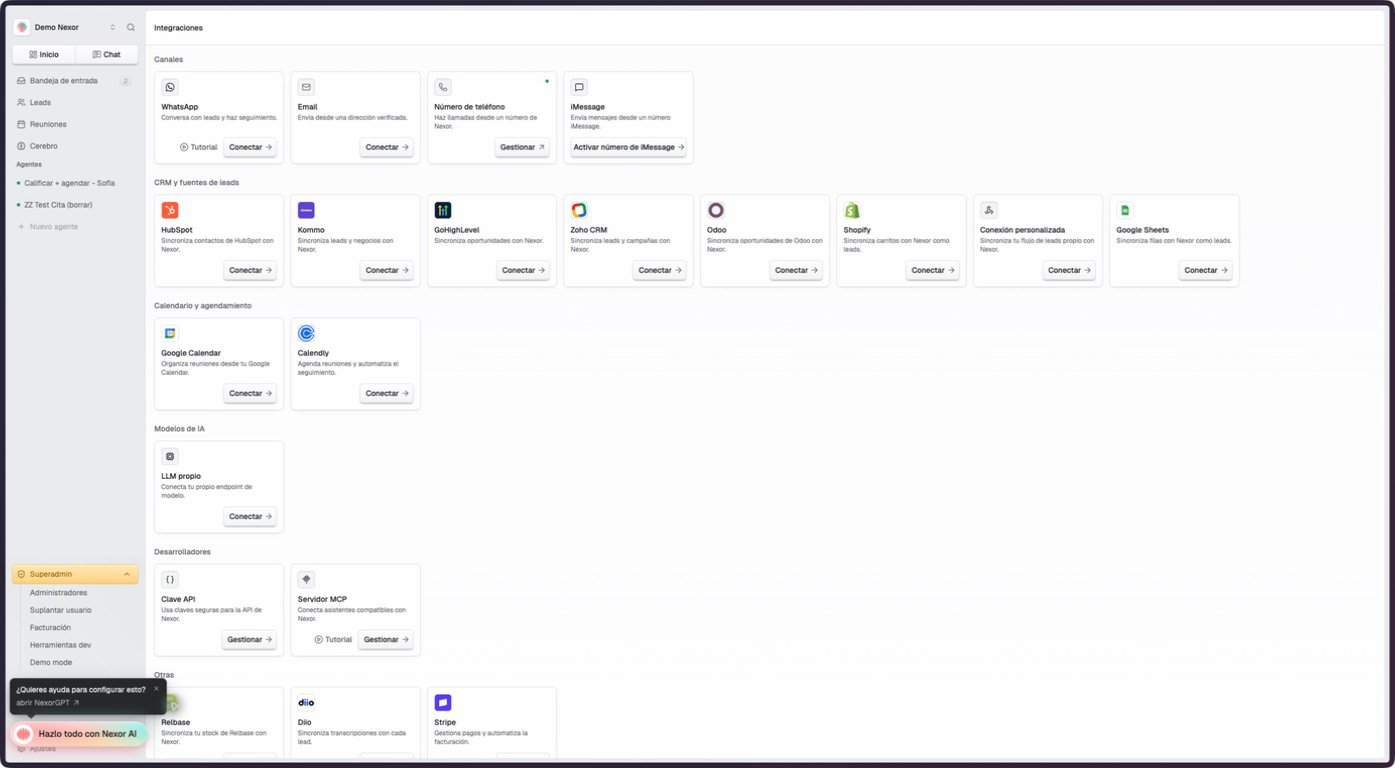
Start on **Settings → Integrations**. The grid is organized by channel, CRM and lead source, calendar, AI model, developer surface, and other business systems.
 ## Dedicated screen or custom connection?
A card with its own Nexor screen means the product has provider-specific setup and status. It does **not** mean every connector has the same direction or features. For example, Zoho is currently outbound-only, while HubSpot has separate input and output controls.
Use a [custom connection](/docs/en/guides/integrations/custom-connection) when your system has no dedicated card. This is the current path for Salesforce, Flowlu, and an in-house CRM. Depending on what the external system can do, connect it with an incoming webhook, the Public API, an outgoing webhook, or an agent HTTP tool.
Do not treat a logo or source label elsewhere in Nexor as proof of a ready-made connector. Salesforce and Flowlu do not have dedicated integration cards.
## CRM and lead sources
| Card | What the verified integration surface covers |
| ------------------------------------------------------------------- | ---------------------------------------------------------------------------------------------------------- |
| [HubSpot](/docs/en/guides/agents/leads/hubspot) | OAuth connection, input doors, contact routing, and configured outputs |
| [Kommo](/docs/en/guides/agents/leads/kommo) | Kommo lead and deal intake |
| [GoHighLevel](/docs/en/guides/integrations/gohighlevel) | Location connections, lead routing, recurring intake, and terminal outcome sync |
| [Zoho CRM](/docs/en/guides/integrations/zoho) | OAuth connection and outbound updates from Nexor to Zoho |
| [Odoo](/docs/en/guides/integrations/odoo) | API-key connection, capability discovery, routing configuration, and preview |
| Shopify | Shopify carts as lead sources |
| [Custom connection](/docs/en/guides/integrations/custom-connection) | Webhooks, API-key intake, cloud functions, and agent HTTP tools |
| [Google Sheets](/docs/en/guides/integrations/google-sheets) | Lead import from selected spreadsheet tabs; the Write mode has a current limitation described in its guide |
## Other cards in the grid
| Group | Cards |
| --------------------- | ------------------------------------------------------------- |
| Channels | WhatsApp, Instagram, Messenger, Email, Phone Number, iMessage |
| Calendar & Scheduling | Google Calendar, Calendly |
| AI models | Self-hosted LLM |
| Developers | API Key, MCP Server |
| Other | Relbase, Diio, Stripe |
Instagram and Messenger appear only when the optional Meta messaging feature is enabled for the account. A self-hosted LLM also depends on account configuration even when its card is visible. Google Calendar may send you to the Meetings connection flow rather than a separate integration page.
## If your system is not listed
1. Confirm whether it can send HTTPS webhooks or make authenticated HTTP requests.
2. Use an [incoming lead webhook](/docs/en/api/webhooks/inbound-leads) for push-based lead delivery.
3. Use the [Public API](/docs/en/api/introduction) when your system can choose the receiving agent on each request or needs broader lead operations.
4. Add outgoing webhooks or agent HTTP tools only for the events and actions your external system needs.
5. Test with synthetic data before enabling live lead traffic.
Nexor does not promise a universal two-way sync for a custom system. The exact behavior is the set of input and output paths you configure.
## Dedicated screen or custom connection?
A card with its own Nexor screen means the product has provider-specific setup and status. It does **not** mean every connector has the same direction or features. For example, Zoho is currently outbound-only, while HubSpot has separate input and output controls.
Use a [custom connection](/docs/en/guides/integrations/custom-connection) when your system has no dedicated card. This is the current path for Salesforce, Flowlu, and an in-house CRM. Depending on what the external system can do, connect it with an incoming webhook, the Public API, an outgoing webhook, or an agent HTTP tool.
Do not treat a logo or source label elsewhere in Nexor as proof of a ready-made connector. Salesforce and Flowlu do not have dedicated integration cards.
## CRM and lead sources
| Card | What the verified integration surface covers |
| ------------------------------------------------------------------- | ---------------------------------------------------------------------------------------------------------- |
| [HubSpot](/docs/en/guides/agents/leads/hubspot) | OAuth connection, input doors, contact routing, and configured outputs |
| [Kommo](/docs/en/guides/agents/leads/kommo) | Kommo lead and deal intake |
| [GoHighLevel](/docs/en/guides/integrations/gohighlevel) | Location connections, lead routing, recurring intake, and terminal outcome sync |
| [Zoho CRM](/docs/en/guides/integrations/zoho) | OAuth connection and outbound updates from Nexor to Zoho |
| [Odoo](/docs/en/guides/integrations/odoo) | API-key connection, capability discovery, routing configuration, and preview |
| Shopify | Shopify carts as lead sources |
| [Custom connection](/docs/en/guides/integrations/custom-connection) | Webhooks, API-key intake, cloud functions, and agent HTTP tools |
| [Google Sheets](/docs/en/guides/integrations/google-sheets) | Lead import from selected spreadsheet tabs; the Write mode has a current limitation described in its guide |
## Other cards in the grid
| Group | Cards |
| --------------------- | ------------------------------------------------------------- |
| Channels | WhatsApp, Instagram, Messenger, Email, Phone Number, iMessage |
| Calendar & Scheduling | Google Calendar, Calendly |
| AI models | Self-hosted LLM |
| Developers | API Key, MCP Server |
| Other | Relbase, Diio, Stripe |
Instagram and Messenger appear only when the optional Meta messaging feature is enabled for the account. A self-hosted LLM also depends on account configuration even when its card is visible. Google Calendar may send you to the Meetings connection flow rather than a separate integration page.
## If your system is not listed
1. Confirm whether it can send HTTPS webhooks or make authenticated HTTP requests.
2. Use an [incoming lead webhook](/docs/en/api/webhooks/inbound-leads) for push-based lead delivery.
3. Use the [Public API](/docs/en/api/introduction) when your system can choose the receiving agent on each request or needs broader lead operations.
4. Add outgoing webhooks or agent HTTP tools only for the events and actions your external system needs.
5. Test with synthetic data before enabling live lead traffic.
Nexor does not promise a universal two-way sync for a custom system. The exact behavior is the set of input and output paths you configure.