> ## Documentation Index
> Fetch the complete documentation index at: https://docs.getnexor.ai/llms.txt
> Use this file to discover all available pages before exploring further.
# Connect GoHighLevel
> Connect one or more GoHighLevel Locations, route open opportunities into Nexor, and sync configured terminal outcomes back.
Connect GoHighLevel to bring eligible opportunities into Nexor through a real-time webhook or a scheduled review. Each source can route to an Agent, and configured terminal outcomes can update the opportunity in GoHighLevel.
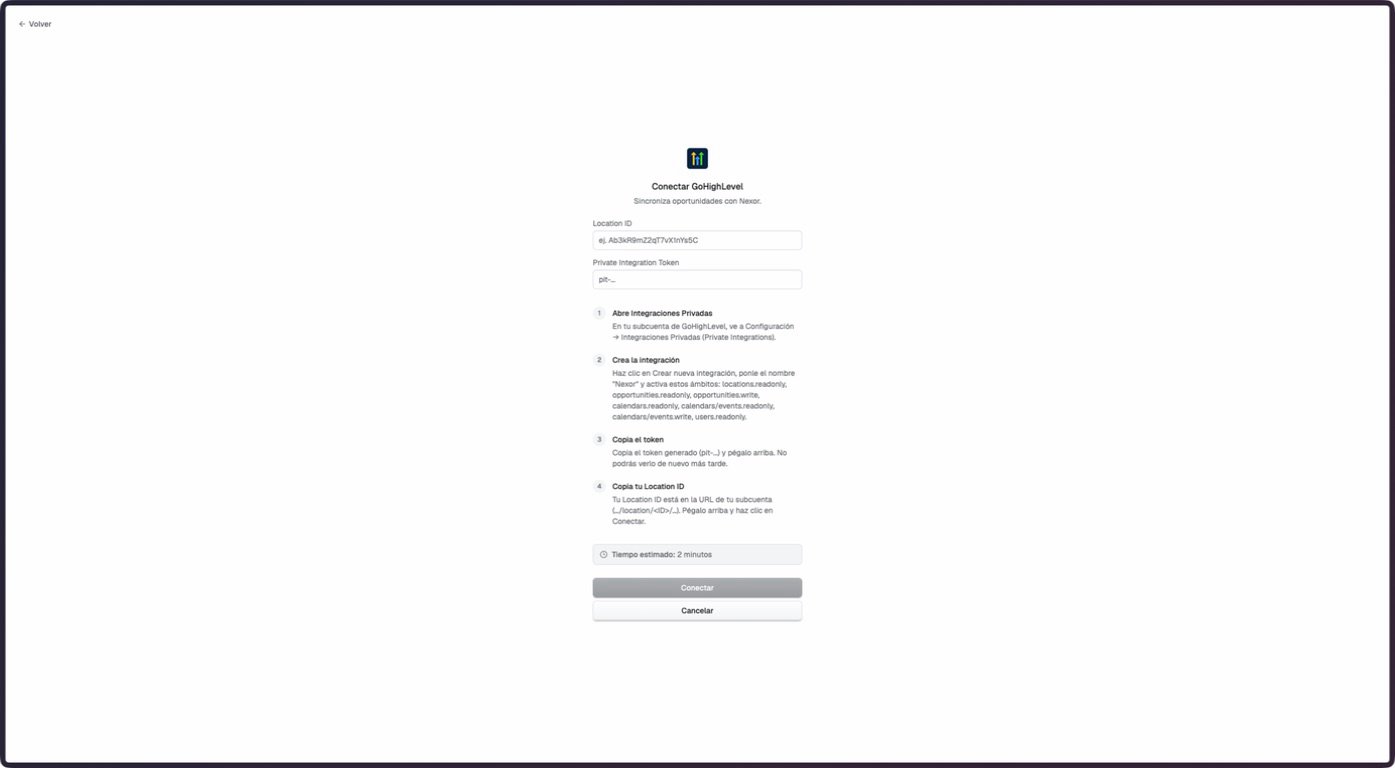 The staging documentation account had no connected GoHighLevel Location. This walkthrough confirms the empty connection form only. Connected subaccount, routing, auto-sync, webhook, and outcome screens were verified against the current product code but could not be captured safely in staging.
## What the integration supports
| Area | Current behavior |
| ---------------- | --------------------------------------------------------------------------------------------------------------------- |
| Connections | Connect more than one subaccount. Each connection represents one GoHighLevel Location. |
| Real-time input | A GoHighLevel Workflow sends an opportunity to a Nexor-generated Custom Webhook URL. |
| Scheduled input | When enabled for the account, Auto-sync checks eligible open opportunities every 10 minutes. |
| Routing | Route a source to an active Agent, skip it, or use a default route. |
| Pause and resume | Pause a saved input route without deleting it. The pause applies to both webhook and scheduled intake for that route. |
| Output | Map terminal Nexor outcomes to a GoHighLevel status, stage, or both. |
This is not a continuous mirror of every GoHighLevel object or stage. The current output runs for configured terminal outcomes.
## Before you connect
You need the **Location ID** and a **Private Integration Token** for the Location. Create the token under **GoHighLevel Settings → Private Integrations** and treat it as a secret.
The permissions shown in the current Nexor connection screen are not a complete setup checklist. The active importer also reads contacts and custom fields. Confirm the current required permissions with Nexor before creating the token, and do not rely on the screenshot as an exhaustive scope list.
## Connect a Location
In the intended GoHighLevel Location, open **Settings → Private Integrations**. Create a private integration with the permissions confirmed for the features that will be used.
Copy the Location ID and the Private Integration Token. Do not place the token in screenshots, tickets, or shared documents.
Go to **Integrations → GoHighLevel**, enter the Location ID and token, and select **Connect**.
After the first connection, use **Add subaccount** to connect another Location. The subaccount selector appears when two or more connections exist.
## Route incoming opportunities
Open **Inputs → Lead routing**. Configure each listed source with one of these destinations:
* An active **Agent** that should receive eligible opportunities.
* **Don't import** when the source must stay outside Nexor.
* The default route for sources that do not match a specific saved rule.
Pipeline routing is the base path. The UI can also show GoHighLevel Workflow sources observed in recent webhook traffic. Some older connections may not have Workflow-source routing enabled, so confirm enablement before relying on those routes.
### Real-time webhook
Open **Real-time webhook**, copy the generated URL, and add it as a **Custom Webhook** action inside the relevant GoHighLevel Workflow.
The webhook URL contains an intake token. Treat the full URL as a secret and never publish it in a screenshot or example.
### Pause one route
Turn off **Accepting leads** on a saved route to pause it without deleting its configuration. The paused route stops accepting both real-time webhook intake and scheduled auto-sync intake. Turn it back on to resume.
## Configure Auto-sync
When enabled for the account, Auto-sync reviews open opportunities every 10 minutes. Select pipelines that already route to an active Agent, optionally limit the eligible stages, and set a cutoff with a timezone.
* Only opportunities with status `open` are eligible.
* Up to 20 pipelines and 200 stages can be included in one saved scope.
* Leaving stages empty includes all eligible stages in the selected pipelines.
* Disabling Auto-sync keeps the webhook and the saved scope intact.
Historical backfill covers eligible opportunities before the recurring-sync cutoff. Backfilled leads are created without an Agent or cadence, so running a backfill does not start outreach.
## Sync terminal outcomes
Open **Outputs → Outcome sync**, choose an Agent, and map each intended terminal result to a GoHighLevel status, stage, or both.
Only configured terminal transitions are written through this path. It does not continuously copy intermediate stages, notes, calls, or meetings.
## GoHighLevel as a booking provider
The Nexor API recognizes GoHighLevel as an external booking provider, but the current dashboard does not expose a verified self-service setup that matches the API's required create, reschedule, and cancel tools.
Use an assisted or API-based setup for GoHighLevel booking. Do not interpret the **GoHighLevel tools** card as a complete booking-provider configuration screen.
## Troubleshooting
Confirm that the route is assigned to an active Agent and that **Accepting leads** is on. A paused route blocks both webhook and scheduled intake.
Check that the opportunity is open, its pipeline has an active route, its stage is in scope, and its date falls within the recurring configuration. Historical opportunities before the cutoff belong to the backfill path.
Some older connections may not have Workflow-source routing enabled. Ask Nexor to confirm enablement before depending on that source.
The staging documentation account had no connected GoHighLevel Location. This walkthrough confirms the empty connection form only. Connected subaccount, routing, auto-sync, webhook, and outcome screens were verified against the current product code but could not be captured safely in staging.
## What the integration supports
| Area | Current behavior |
| ---------------- | --------------------------------------------------------------------------------------------------------------------- |
| Connections | Connect more than one subaccount. Each connection represents one GoHighLevel Location. |
| Real-time input | A GoHighLevel Workflow sends an opportunity to a Nexor-generated Custom Webhook URL. |
| Scheduled input | When enabled for the account, Auto-sync checks eligible open opportunities every 10 minutes. |
| Routing | Route a source to an active Agent, skip it, or use a default route. |
| Pause and resume | Pause a saved input route without deleting it. The pause applies to both webhook and scheduled intake for that route. |
| Output | Map terminal Nexor outcomes to a GoHighLevel status, stage, or both. |
This is not a continuous mirror of every GoHighLevel object or stage. The current output runs for configured terminal outcomes.
## Before you connect
You need the **Location ID** and a **Private Integration Token** for the Location. Create the token under **GoHighLevel Settings → Private Integrations** and treat it as a secret.
The permissions shown in the current Nexor connection screen are not a complete setup checklist. The active importer also reads contacts and custom fields. Confirm the current required permissions with Nexor before creating the token, and do not rely on the screenshot as an exhaustive scope list.
## Connect a Location
In the intended GoHighLevel Location, open **Settings → Private Integrations**. Create a private integration with the permissions confirmed for the features that will be used.
Copy the Location ID and the Private Integration Token. Do not place the token in screenshots, tickets, or shared documents.
Go to **Integrations → GoHighLevel**, enter the Location ID and token, and select **Connect**.
After the first connection, use **Add subaccount** to connect another Location. The subaccount selector appears when two or more connections exist.
## Route incoming opportunities
Open **Inputs → Lead routing**. Configure each listed source with one of these destinations:
* An active **Agent** that should receive eligible opportunities.
* **Don't import** when the source must stay outside Nexor.
* The default route for sources that do not match a specific saved rule.
Pipeline routing is the base path. The UI can also show GoHighLevel Workflow sources observed in recent webhook traffic. Some older connections may not have Workflow-source routing enabled, so confirm enablement before relying on those routes.
### Real-time webhook
Open **Real-time webhook**, copy the generated URL, and add it as a **Custom Webhook** action inside the relevant GoHighLevel Workflow.
The webhook URL contains an intake token. Treat the full URL as a secret and never publish it in a screenshot or example.
### Pause one route
Turn off **Accepting leads** on a saved route to pause it without deleting its configuration. The paused route stops accepting both real-time webhook intake and scheduled auto-sync intake. Turn it back on to resume.
## Configure Auto-sync
When enabled for the account, Auto-sync reviews open opportunities every 10 minutes. Select pipelines that already route to an active Agent, optionally limit the eligible stages, and set a cutoff with a timezone.
* Only opportunities with status `open` are eligible.
* Up to 20 pipelines and 200 stages can be included in one saved scope.
* Leaving stages empty includes all eligible stages in the selected pipelines.
* Disabling Auto-sync keeps the webhook and the saved scope intact.
Historical backfill covers eligible opportunities before the recurring-sync cutoff. Backfilled leads are created without an Agent or cadence, so running a backfill does not start outreach.
## Sync terminal outcomes
Open **Outputs → Outcome sync**, choose an Agent, and map each intended terminal result to a GoHighLevel status, stage, or both.
Only configured terminal transitions are written through this path. It does not continuously copy intermediate stages, notes, calls, or meetings.
## GoHighLevel as a booking provider
The Nexor API recognizes GoHighLevel as an external booking provider, but the current dashboard does not expose a verified self-service setup that matches the API's required create, reschedule, and cancel tools.
Use an assisted or API-based setup for GoHighLevel booking. Do not interpret the **GoHighLevel tools** card as a complete booking-provider configuration screen.
## Troubleshooting
Confirm that the route is assigned to an active Agent and that **Accepting leads** is on. A paused route blocks both webhook and scheduled intake.
Check that the opportunity is open, its pipeline has an active route, its stage is in scope, and its date falls within the recurring configuration. Historical opportunities before the cutoff belong to the backfill path.
Some older connections may not have Workflow-source routing enabled. Ask Nexor to confirm enablement before depending on that source.