> ## Documentation Index
> Fetch the complete documentation index at: https://docs.getnexor.ai/llms.txt
> Use this file to discover all available pages before exploring further.
# Route inbound leads between tasks
> When an agent has two or more tasks, the Router decides which task handles each new inbound lead: always the same task, or the task that fits what the lead says, with a fallback task when it is unclear.
The **Router** decides which task takes a new lead who contacts your agent. It only appears when the agent has two or more tasks. With a single task, every inbound lead goes straight to that task.
## Where to find it
Select the agent, open the right pane (**Configuration**), and go to **Channels**. The **Router** is the first block of that section.
## Router off: one task receives every inbound lead
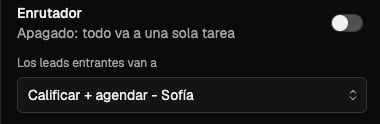
The switch is off by default and reads **Off: everything goes to one task**. Choose the task under **Inbound leads go to**. Every new inbound lead on the agent's channels starts in that task.
 ## Router on: Nexor picks the task
Turn the switch on and it reads **Nexor picks the task based on what the lead says**. Nexor reads the first message of each new inbound lead and sends the lead to the task that fits it.
The selector below changes to **If it's unclear, route to**. That is the fallback task: it receives the lead when the message does not make clear which task should handle it.
Give each task a clear description of which leads it should handle. Nexor uses it to tell the tasks apart, so two tasks with similar descriptions are harder to route.
## Which leads go through the Router
The Router only decides for leads **without an open conversation** in the agent.
| Situation | Where the lead goes |
| - | - |
| A new lead writes or calls for the first time | The Router decides: the selected task, or the task that fits the message. |
| A lead already has a conversation in a task | The lead stays in that task. The Router does not move it. |
| A lead loaded into a task from a list, CSV, the API, or a CRM, who then replies | The lead keeps going to the task it was loaded into. |
| An outbound list | You always load it into a specific task. The Router only decides for inbound leads. |
## Channels belong to the agent
All tasks of an agent share its numbers and inboxes: WhatsApp, calls, SMS, iMessage, email, and web chat. You connect a channel once on the agent and every task uses it. The Router decides which task answers; the channel stays the same.
## Inbound calls need the Router
If the agent receives inbound calls, the Router must stay on. Trying to turn it off shows:
> This agent takes inbound calls, which need the router. Turn off inbound calls first.
Turn off inbound calls for the agent first, then turn off the Router.
## Next
Split a process into tasks and hand leads from one task to the next.
What the agent shares with its tasks and what each task controls.
## Router on: Nexor picks the task
Turn the switch on and it reads **Nexor picks the task based on what the lead says**. Nexor reads the first message of each new inbound lead and sends the lead to the task that fits it.
The selector below changes to **If it's unclear, route to**. That is the fallback task: it receives the lead when the message does not make clear which task should handle it.
Give each task a clear description of which leads it should handle. Nexor uses it to tell the tasks apart, so two tasks with similar descriptions are harder to route.
## Which leads go through the Router
The Router only decides for leads **without an open conversation** in the agent.
| Situation | Where the lead goes |
| - | - |
| A new lead writes or calls for the first time | The Router decides: the selected task, or the task that fits the message. |
| A lead already has a conversation in a task | The lead stays in that task. The Router does not move it. |
| A lead loaded into a task from a list, CSV, the API, or a CRM, who then replies | The lead keeps going to the task it was loaded into. |
| An outbound list | You always load it into a specific task. The Router only decides for inbound leads. |
## Channels belong to the agent
All tasks of an agent share its numbers and inboxes: WhatsApp, calls, SMS, iMessage, email, and web chat. You connect a channel once on the agent and every task uses it. The Router decides which task answers; the channel stays the same.
## Inbound calls need the Router
If the agent receives inbound calls, the Router must stay on. Trying to turn it off shows:
> This agent takes inbound calls, which need the router. Turn off inbound calls first.
Turn off inbound calls for the agent first, then turn off the Router.
## Next
Split a process into tasks and hand leads from one task to the next.
What the agent shares with its tasks and what each task controls.